Local by default, cloud when you ask
Every picture, voice, and subtitle in Studio is made locally on your own GPU - free, no account, nothing leaves your box. On top of that, an engine router lets you send specific jobs - character stills, video shots, lip-synced clips - to Higgsfield.aiin the cloud, paid for with your own Higgsfield subscription. It’s strictly opt-in, per capability, and the only thing that ever leaves your machine is the job you explicitly route out.
When you’d use the cloud
- You want a bigger or different video model than the local zeroscope masters - Higgsfield carries the Seedance family and others, at higher fidelity than a single 11 GB card can run.
- You installed the light build (no --with-talking-head, or no big GPU at all). The headless install skips the heavy model packs and leans on the cloud for generation, so a laptop can still drive the whole pipeline.
Engine routing
Project menu → Settings → Engines is a small matrix: for each capability you pick which engine handles it. The four capabilities are masters(the episode’s video shots in the main render), stills (character reference images), cloud video, and lipsync (talking heads from a still + an audio track). Each endpoint shows a live dot - green reachable, red not - so you can see at a glance whether your ComfyUI, your remote box, and Higgsfield are up.
- Local ComfyUI - the default for masters and stills. Runs the bundled Z-Image graph on your GPU.
- Higgsfield - the cloud option for stills, cloud video, and lipsync. Needs a connected account (below).
- Remote render - another machine on your LAN running the render service (e.g. a second, beefier GPU box). Point Studio at its URL and enable it.
The routing and endpoint URLs live in ~/.config/macu-studio/engines.json. Anything set by an environment variable (MACU_COMFY_URL, MACU_ENGINE_REMOTE_URL, MACU_ROUTE_*) wins over the file and shows an override badge in the UI, so a server deployment can pin engines without anyone changing them by hand.
The character library
Characters (top-bar tab) is a show-level roster that lives at shows/<show>/characters/<key>/. Each character holds a still_prompt and a stack of takes - generated reference stills, one PNG each, immutable and numbered. You star a default take; using a character in an episode copies that take into the episode’s stills/ and binds it in the manifest, so the same face drives every shot of that character. Takes can be generated by any engine routed to stills - local ComfyUI, Higgsfield, or a remote box.
You can seed the roster from an episode you’ve already built (Import from episode- its manifest characters and existing stills become take-001), and re-use a character across every episode of the show. Because a still’s identity is part of a cloud shot’s cache key, swapping a character’s bound take to a different image will re-bill any cloud clips that referenced it - Studio warns you which shots that affects before you commit.
Connect a Higgsfield account
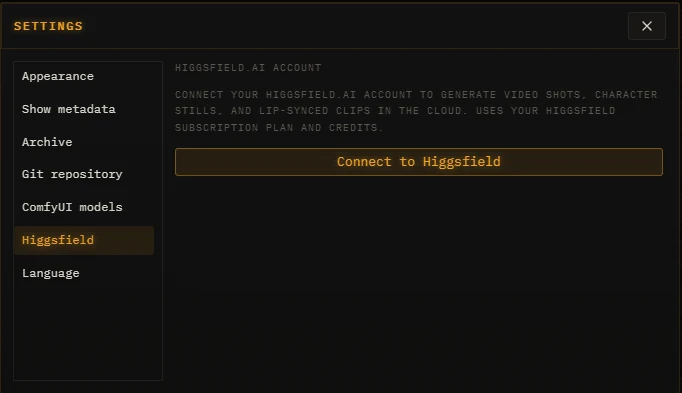
Settings → Higgsfield → Connect to Higgsfieldopens a browser tab to sign in. (Studio’s local URL needs to be https-or-localhost for the OAuth redirect; if you run Studio on a LAN IP, the connect flow falls back to a paste-the-URL box.) Approve, and Studio stores the token at ~/.config/macu-studio/macu-web.json - never in git, never in a log.
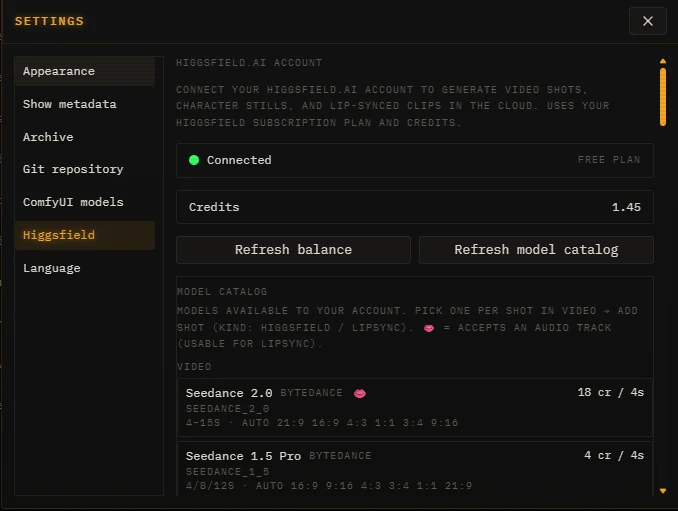
Once connected the panel shows your plan, your live credit balance, and the model catalog - every video / image / lipsync model your account can use, grouped by output type, each with its per-shot cost and the aspect ratios and durations it supports. A 👄 marks a model that accepts an audio track, i.e. one usable for lipsync. Refresh balance and Refresh model catalog re-pull both.
Billing & caching
Cloud generations cost real credits, so Studio treats them like the precious things they are. Every cloud clip and still is hashed by the inputs that cost money - prompt, model, seed, source still, resolution - and that hash is recorded in a sidecar next to the artifact (clips/.hf_cache.json, stills/.cache.json). On the next render, a matching hash with the file present is a cache hit: the shot is skipped and nothing is billed. Editing a crop, a trim, or assembly timing never re-bills - those are applied locally at assembly from the cached clip.
Paying a flat-rate “unlimited” plan? Note that those tiers usually only apply in the provider’s web app - the API bills per generation regardless. Studio has a way around that: see Higgsfield Integration.
Moving a show between installs
Studio has two distinct ways to move work, and the split is deliberate - it keeps anything heavy off mayorawesome.com ↗:
- Sync (top bar) is text only- scripts, manifests, docs, and character records, reconciled both ways through your show’s web connection. One click figures out what to push and pull. It never moves binaries.
- Import / Export (Project menu) is the binary path - a zip of the text plusthe voice reference clips, the character library (records + takes), each episode’s stills, and the paid Higgsfield clips. Crucially, the stills and cloud clips travel with their cache sidecars, so importing a show onto a second machine is a guaranteed cache hit - your paid generations never re-bill. Cheap-to-regenerate local renders are left out to keep the zip small.
So a typical two-box setup keeps text in constant Sync, and uses an Export/Import whenever you want the actual pixels (and the credits you already spent on them) on the other machine.
Privacy
The only data that reaches Higgsfield is the input for a job you routed to it - a prompt, a seed, and (for lipsync / image-to-video) the still or audio that shot needs. Capabilities you leave on a local engine never touch the network. The connect token is stored 0600 in your config dir and redacted from logs. As with the rest of Studio, nothing is shared until you explicitly send it - here, by routing a capability to the cloud and confirming the spend.